Forum Help Center Help Center Write address
Discussion

Write address

Started by HanneCrafts · Feb 15, 2023 · 4 replies · 464 views

Feb 15, 2023 at 8:18pm Original post
#1

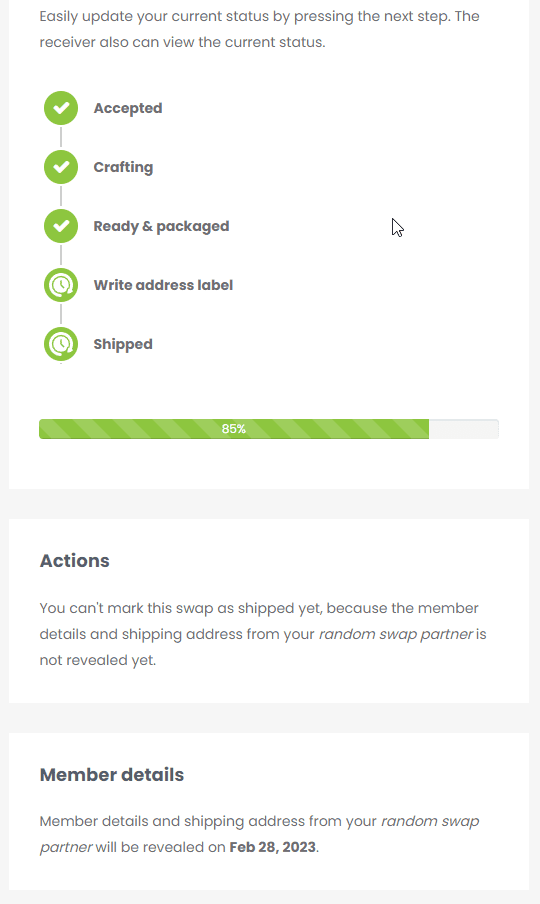
I just wrote my random postcard and i accidentally clicked write address in the progress bar, but the address isn't available yet. This should not be a problem right?

I am Working On My PhD (Projects Half Done).

Feb 15, 2023 at 8:36pm
#2

Don't worry @HanneCrafts ; this is not a problem. You can write down the address as soon as it becomes available.  @The Stylist , could you please take a look at this?

Founder of Snail Mail Friends, spreading happiness through Snail Mail. Making the world a happier place, one snail mail at a time ^_^

Feb 15, 2023 at 9:37pm
#3

@HanneCrafts Going forward, the system has been updated to prevent the 'Write address label' step from being initiated until the recipient's address has been revealed by a random swap which should help ensure a smoother and more efficient user experience.

Digital Content Developer and Platform Engineer at Snail Mail Friends

Feb 16, 2023 at 9:27pm
#4

Hello, I sent sent my swap out but forgot to click on write address and shipped.  I will send my partner a message.  I'm still getting used to this new format. Is there anything else I can do? Now it looks like I was late in sending.  Wait, if i'm not friends with her, how can I send her a message? Oh and I can't see when she was last online.


"I can't, I"m crafting today" 

Last edited by Petaltea on Feb 16, 2023 at 9:32pm
Feb 16, 2023 at 10:41pm
#5

@Petaltea You can still follow the steps to write the address label and then click on "Shipped". This will notify the recipient immediately and everything will be set in motion. You can always send a private message via https://www.snailmailfriends.com/private-messages?&page=1 to let the recipient know about the delay.

Digital Content Developer and Platform Engineer at Snail Mail Friends

login

Log in to reply ➔