Forum Help Center Help Center Art Gallery
Discussion

Art Gallery

Started by Emmanuelle · Aug 2, 2023 · 4 replies · 421 views

Aug 2, 2023 at 3:30pm Original post
#1

Hello,

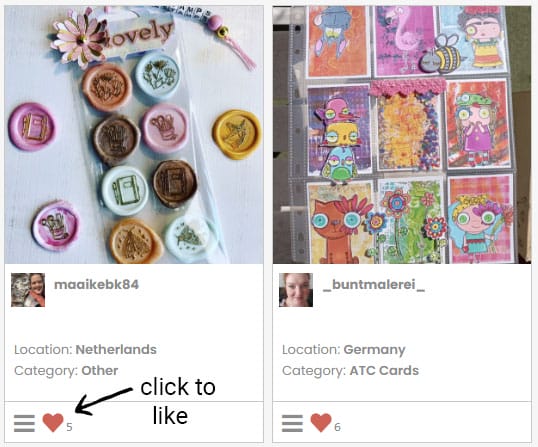
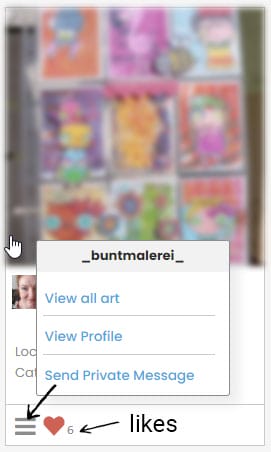
How do you like the photos in the art gallery ? There is no "heart button" (I use a pc). Also, what is the number next to the three grey lines at the bottom of each photo ? Thanks.

Emmanuelle

Emmanuelle

Aug 3, 2023 at 3:01pm
#2
Emmanuelle wrote:

Hello,

How do you like the photos in the art gallery ? There is no "heart button" (I use a pc). Also, what is the number next to the three grey lines at the bottom of each photo ? Thanks.

Emmanuelle

Hi Emmanuelle,

If you don't see the heart icon, please let us know your operating system and browser so we can investigate and replicate the issue.

Typically, on a Windows computer, to like the photo, click the gray heart to turn it red. The number beside it indicates the total likes. ❤️ it normally appears as follows:

Founder of Snail Mail Friends, spreading happiness through Snail Mail. Making the world a happier place, one snail mail at a time ^_^

Aug 9, 2023 at 9:15pm
#3

Thank you very much ! I use Window 10 and Firefox and no,  there is no heart, just the 3 grey lines. THat's why I was confused.

Emmanuelle

Aug 10, 2023 at 5:20pm
#4

Hi @Emmanuelle can you try it again? I made a small adjument in the code.

Please let me know if it worked out for you, and if you can click it to like the image(s)

Digital Content Developer and Platform Engineer at Snail Mail Friends

login

Log in to reply ➔